
-
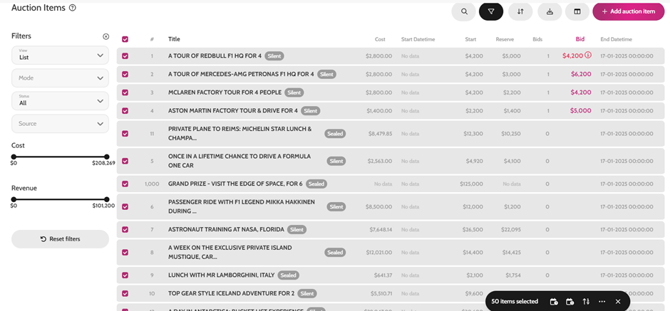
Go to All pages > ALL Auction Items
- Select all items using the tick box at the top on the left
- Then scroll down to bulk action and select Update End Date/Time > click Now (or choose the time the auction will close if you know it) > Save (this will close the bidding on auction items)
* You can skip this step if you have already set the end time for your auction items when setting them live.
To manually collect payments when items have closed simply:
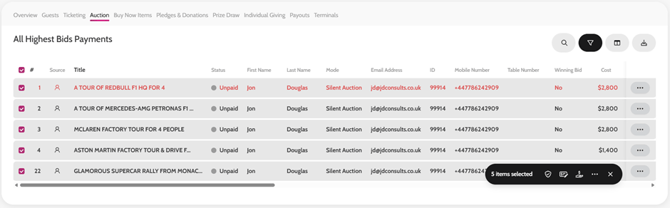
- Go to Payments > Auction
- Filter by All Highest Bids
- Select all items using the tick box at the top (left of item number)
- Click Make Winner & Collect Payments
- This will then charge guests’ cards (if you have had pre-authorization of cards on) and send out the communication template ‘Auction Item Winner – Collect Payment’
- It takes 5 minutes for the system to process all payments, but you can see how this is progressing by refreshing the page, and once a payment is taken it will appear with a reference in the Ref column and status will change to Paid
You can amend the Communication templates for Auction Item Winners beforehand if you wish to include instructions on how to collect their items, or add a personal touch.
Update Auction Items End Date/Time
Make Winner
Video instructions